Let’s be honest with ourselves for a second: AI fatigue is very real. Every single week, a flashy new startup launches, promises to revolutionize your workflow, and immediately slaps a $20-a-month subscription fee on your screen. If you are like me, your credit card statement is probably crying from all these micro-subscriptions.
But here is the good news: the tide is turning. We are entering an era where high-end AI capabilities are being democratized. Finding the best free AI tools that actually deliver premium value—without sneakily asking for your payment details—has become the ultimate digital cheat code. Whether you are a content creator trying to scale your output, a student drowning in textbook chapters, or a business owner wearing too many hats, you don’t need to spend a fortune to stay ahead of the curve.
I have spent the last few weeks digging through the noise, bypass-testing dozens of platforms, and filtering out the junk. In this deep-dive series, we are going to look at the absolute best free AI tools available right now that offer genuine, unrestricted utility. No bait-and-switch trials, no useless watermarks. Just pure, unadulterated value.
⚡ Quick Summary: The Part 1 Powerhouses
Before we dive into the nitty-gritty details of our first two featured tools, here is a high-level look at what makes them earn a spot on our list of the best free AI tools this year.
| AI Tool | Primary Use Case | Standout Free Feature | My Verdict |
|---|---|---|---|
| NoteGPT | Learning assistant, summarization, voice cloning, and AI rewriting. | YouTube to Mind Map & 100k-word Text-to-Speech limit. | Must-have for students & content creators. |
| Meta AI | Realistic image generation, style modifications, and image-to-video animation. | Custom image creation with reference photos & instant animation. | Best free Midjourney & Runway alternative. |
1. NoteGPT: The Swiss Army Knife of Learning & Productivity
If you are a student trying to survive exam season, or a content creator trying to dissect hours of video research, your cognitive load is constantly redlining. Enter NoteGPT. I’ll be honest: when I first heard the name, I expected a basic, boring notepad app with a ChatGPT API slapped on top. I was dead wrong.
NoteGPT is a massive, multi-functional workspace designed specifically to condense massive amounts of information into actionable knowledge. It operates on three main pillars: YouTube AI, Document AI, and an incredibly generous Audio/Writing suite.
The YouTube AI Engine: No More 3-Hour Video Slogs
Let’s say you need to extract information from a highly detailed technical video or a long-winded tutorial. Instead of wasting an hour watching it at 2x speed while frantically taking notes, you simply drop the YouTube link into NoteGPT.
Within seconds, the tool generates a comprehensive, structured summary of the entire video. But it doesn’t just spit out a wall of text. It organizes the key takeaways into neat, readable tables, complete with precise timestamps.
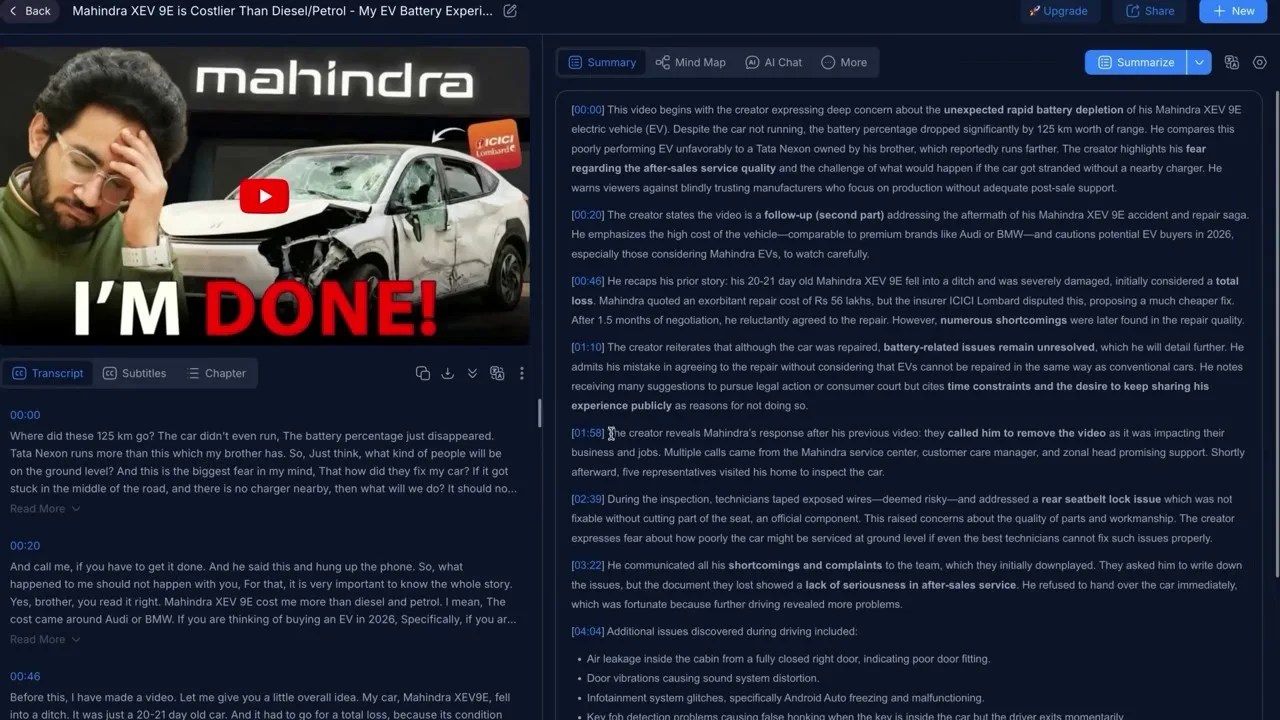
The NoteGPT dashboard in action, turning a complex YouTube video into structured summaries and visual mind maps with a single click.
What blew me away, however, is the Mind Map generator. With a single click, the textual summary is transformed into an interactive visual map. If you are a visual learner like me, this is a lifesaver. You can see the hierarchy of ideas, how they connect, and expand on sub-topics. If something in the mind map is unclear, you don’t have to scroll back to the video; you can use the integrated AI Chat feature to query the video directly (e.g., “Explain what the speaker meant by the second point in the table”), and it will extract the exact answer for you.
Additionally, for creators who need to generate subtitles or scripts, the YouTube Transcriber tool generates a flawless, timestamped transcript of any video in seconds—completely bypassing the clumsy and often inaccurate default YouTube transcriptions.
The Document AI: Shrinking 13 Pages into 1
But what if your study material isn’t on YouTube? What if you are dealing with a dry, 50-page academic paper or a dense textbook chapter? NoteGPT’s AI Summarizer handles uploaded documents with terrifying efficiency.
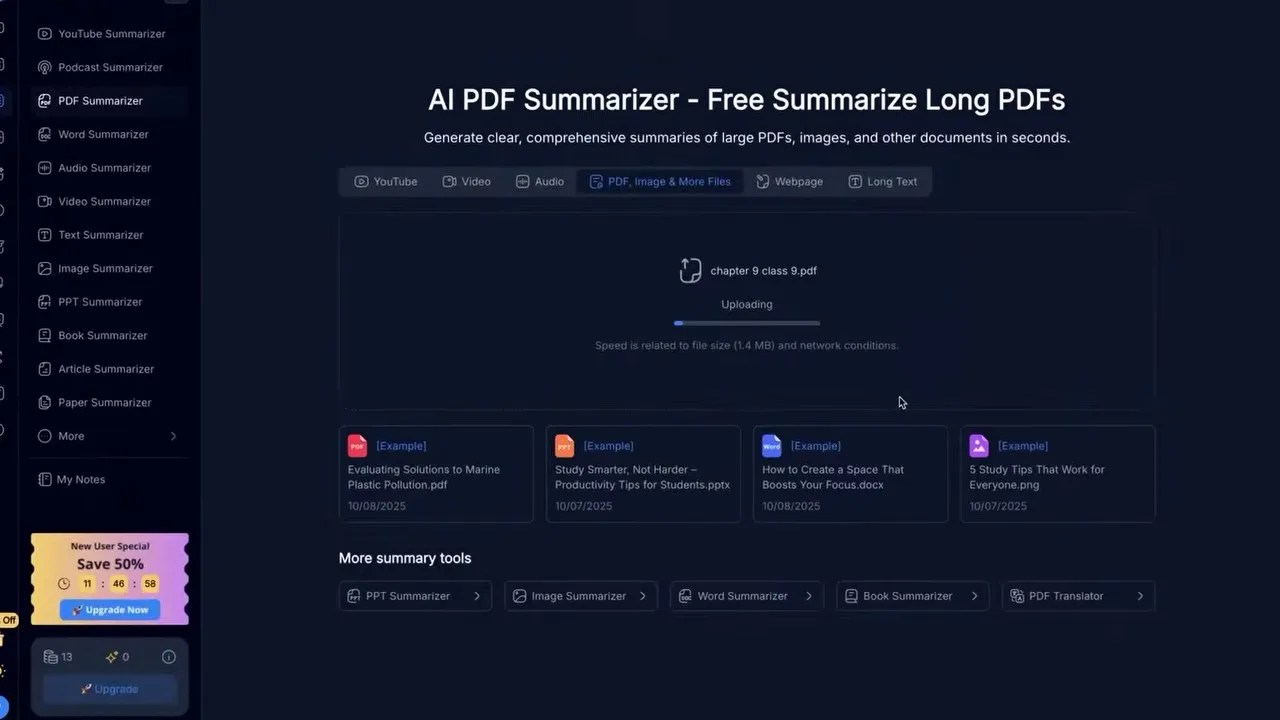
Condensing heavy reading: NoteGPT taking a dense, multi-page textbook chapter and distilling it down to one highly readable page of core insights.
As shown above, I tested this by uploading a standard 13-page textbook chapter. Reading this manually, highlighting key concepts, and taking notes would easily take an hour. NoteGPT condensed the entire document into a single page of high-yield bullet points without losing the critical context. For backbenchers and crammers, this tool is practically a superpower.
Free Voice Cloning & Humanized Writing
If NoteGPT only did summarization, it would still be one of the best free AI tools on the market. But they went a step further by integrating highly premium audio and writing tools that usually cost a pretty penny elsewhere.
Take their AI Voices (Text-to-Speech) feature. Usually, if you want high-quality, natural-sounding voiceovers, you have to shell out at least $10 to $20 a month for platforms like ElevenLabs. NoteGPT gives you a jaw-dropping 100,000 words limit for free. That is roughly equivalent to 100 minutes of high-quality voiceover. The voices don’t sound like robotic GPS navigators from 2012; they have natural inflections, pauses, and emotional depth. You can clone your own voice or design an entirely new voice from scratch.
And for those times when you write an essay or an email with AI and it sounds painfully sterile, the AI Humanizer tool is a neat addition. You paste in your ChatGPT-generated draft, and the tool intelligently replaces robotic phrasing with natural, human-like transitions, injecting emotional nuance so it bypasses typical AI detectors seamlessly.
2. Meta AI: High-Fidelity Generative Art and Animation Without the Premium Price Tag
Remember when AI-generated art first went viral? Everyone was sharing those hyper-realistic, stylistic images of public figures in bizarre scenarios. Most people assumed these creators were paying hefty subscriptions to Midjourney or using complex local installations of Stable Diffusion.
The truth? A massive chunk of the community has quietly been using Meta AI. Built directly into Meta’s ecosystem and powered by their cutting-edge open-source models, Meta AI is an absolute powerhouse for generative art and video—and it is completely free.
From Prompt to Animation: The Creative Workflow
Creating custom art with Meta AI is incredibly straightforward. After logging in, you head over to the creation panel. You can select your desired resolution, choose between image or video outputs, and write your prompt.
But where Meta AI truly shines is its ability to use reference photos. If you want to generate an image of a specific person in a completely fictional setting, you can upload their photo as a style or character reference.

Meta AI’s creation interface, allowing users to combine custom prompts with reference photos to produce stunningly realistic, stylistically consistent images.
As you can see, the realism of the output is staggering for a free tool. The skin textures, lighting, and environmental reflections rival paid generation engines. If you don’t like the initial style, you can instantly shift it—moving from photorealistic to 3D anime, oil painting, or cyberpunk sketch in a couple of seconds.
But the real magic happens when you hit the Animate button. Meta AI allows you to convert any static image into a dynamic video. You can choose “Normal Animate” for a quick, automated motion pass, or “Custom Animate” where you write a specific prompt describing how you want the subject to move.
While it is highly impressive for a free tool, keep a critical eye on the motion transitions—like many generative video tools, extremely complex movements can sometimes introduce minor visual artifacts. However, for generating engaging social media B-roll, background animations, or memes, it is incredibly fun and shockingly capable.
To take your Meta AI animations a step further, you can even overlay trending music tracks directly within the platform. If you are looking to grow a theme page on Instagram or TikTok, or want to generate high-fidelity AI avatars for your YouTube channel without spending a dime, this is your goldmine. Ordinarily, if you wanted to generate realistic talking avatars or advanced lip-sync videos, you would have to pay around $30 to $40 a month (roughly ₹3000) for premium services like HeyGen. With Meta AI, you can bypass those paywalls entirely and keep your budget at a clean zero.
But what if your goals are less about creating viral memes and more about building a legitimate business? Let’s move on to our next tool, which is a complete game-changer for entrepreneurs.
3. Famely AI: The Free Marketing Manager Your Small Business Didn’t Know It Needed
If you run a startup, a local business, or a side hustle, you already know that marketing is a massive bottleneck. Hiring a social media manager or a creative agency can easily drain thousands of dollars from your runway. That is where Famely AI steps in. Developed as a specialized marketing agent within the Google ecosystem, Famely AI acts as a virtual Chief Marketing Officer (CMO) that works around the clock for free.
The onboarding process is brilliant in its simplicity. You don’t have to fill out endless creative briefs or explain your brand positioning from scratch. You simply paste your website’s URL into the platform.
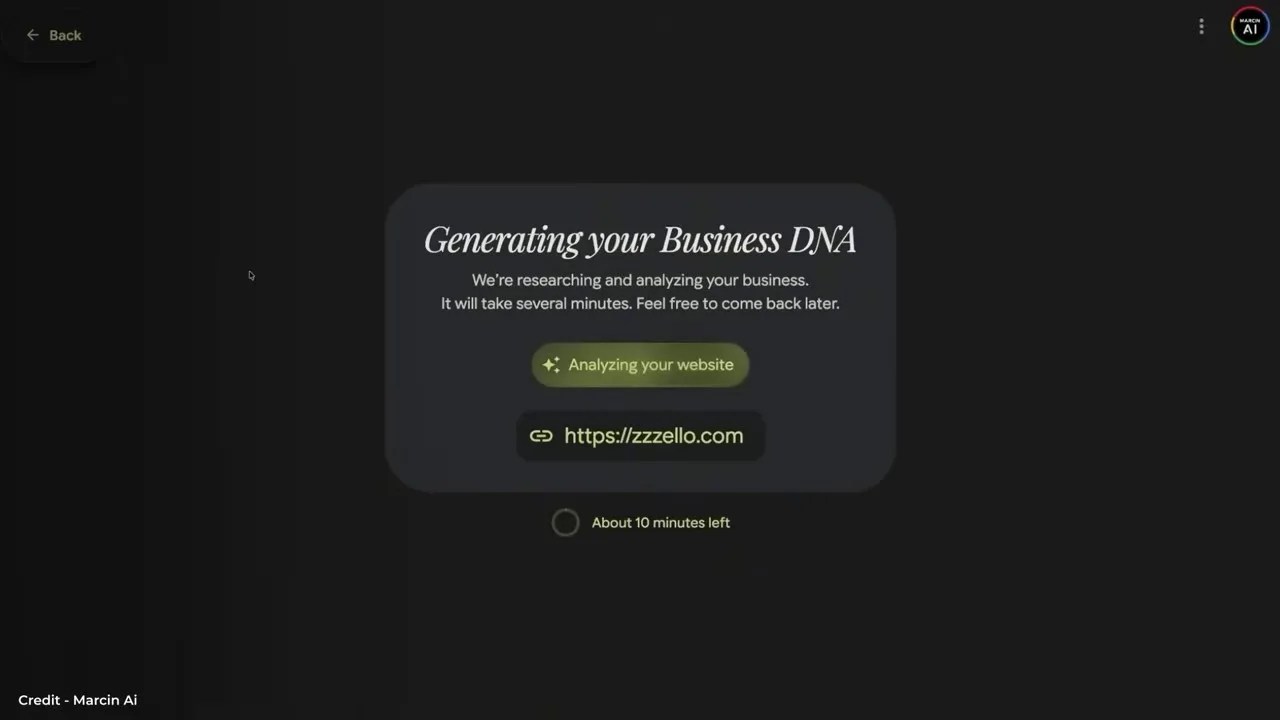
Famely AI analyzing a live website to instantly extract and organize the brand’s visual identity, including logos, typography, and color palettes.
Once Famely AI crawls your site, it reverse-engineers your brand’s “DNA.” As shown in the dashboard above, it automatically extracts your logo, identifies your primary and secondary brand colors, maps out your font styles, and deciphers your core brand values.
From there, the AI begins constructing tailored marketing campaigns. If you are fresh out of ideas, you can simply click “Suggest Idea,” and the system will brainstorm social media campaigns based on your industry and audience. It doesn’t just stop at text ideas, either; it generates complete visual creatives and social media graphics designed around your exact brand colors and assets.
The best part? If a generated graphic isn’t quite hitting the mark, you don’t have to accept it as-is. The platform features an intuitive editor that allows you to tweak the layout, adjust the text, or swap images to match your exact vision. It’s an incredibly streamlined way to automate your organic social media presence without paying agency fees.
4. Opple: Building Interactive Apps with Zero Code and Pure Prompts
For years, the tech world has preached that coding is the ultimate modern literacy. But what if you could completely bypass the syntax, the debugging, and the steep learning curve of software development? Opple is easily one of the most disruptive additions to our list of the best free AI tools because it turns plain-English descriptions into fully functional, interactive web applications.
Opple allows you to build what are known as “vibe apps”—lightweight, interactive, and highly personalized applications designed to solve specific problems or entertain an audience. You don’t need to know HTML, CSS, or Python; you just need an idea.

Building an app with words: Opple generating a live, interactive horoscope application complete with user inputs, logic workflows, and a polished user interface.
To test its limits, I prompted Opple to build a personalized daily horoscope app. I pasted in a detailed prompt describing how the app should function, and Opple instantly mapped out a logical workflow on the left side of the screen while rendering a live, interactive simulation on the right.
As you can see from the interface, the app is fully functional. It prompts the user for their name and birth details, processes the input, and then dynamically generates their daily, weekly, and monthly horoscopes, complete with moon signs, sun signs, and lucky numbers. The UI design is incredibly clean, featuring home pages, report tabs, and settings menus that you can customize manually.
Once you are happy with how your app “vibes,” you can publish it with a single click. Opple provides a shareable public link that you can send to friends, clients, or users.
The Hustler’s Angle: Think about the local businesses in your neighborhood—gyms, cafes, local boutiques. Most of them don’t have the budget to hire a software engineer for basic digital tools (like a simple calorie calculator, a booking form, or a loyalty point tracker). With Opple, you can build these micro-apps in ten minutes using simple prompts, package them up, and sell them to local businesses for pure profit with virtually zero overhead.
5. My Lens: Taming Information Overload with Hyper-Detailed, Citable Mind Maps
If your daily work involves wading through mountains of research, legal documents, financial reports, or academic papers, you know how exhausting it is to keep track of the big picture. My Lens is a highly specialized visual mapping tool designed to turn dense, chaotic data into structured, multi-dimensional mind maps.
Unlike basic mind-mapping tools where you have to manually type out every node, My Lens does the heavy lifting for you. You can upload massive PDF documents or simply type a complex topic into the prompt bar, select a visual style that fits your aesthetic, and let the AI build the map.
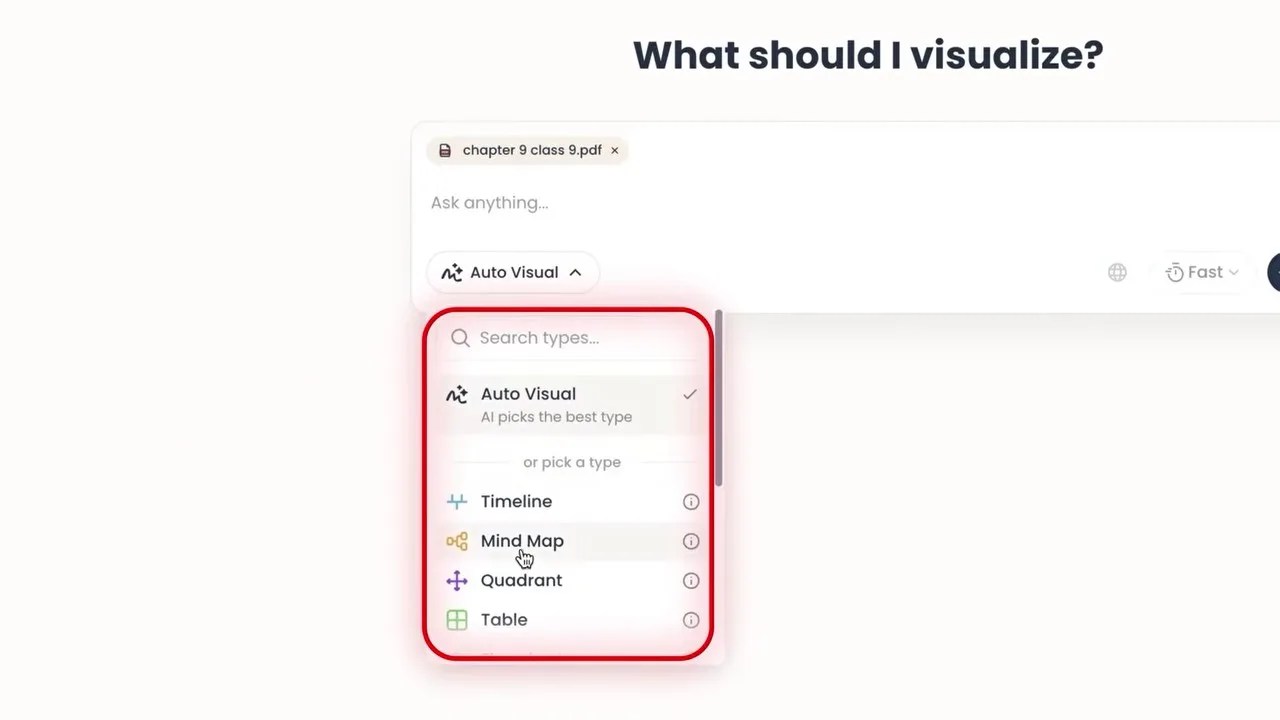
Navigating dense research visually: My Lens expanding complex topics into nested sub-points with direct citations pointing back to the source document.
What makes My Lens truly indispensable for professionals is its deep interactive capabilities. It isn’t just a static graphic. If a particular node catches your eye, you can click “Expand” to instantly branch out into deeper sub-points. If you need a comprehensive breakdown of a specific sub-topic, the “Drill Down” feature will generate a highly detailed, localized explanation right inside the map.
But the absolute killer feature here is the **Citation tool**. If you are a lawyer, a financial analyst, or a researcher, you cannot afford to rely on AI-generated information without verifying it. When you click on any point in a map generated from your uploaded PDFs, My Lens highlights the exact page and paragraph where that information was extracted. It drastically cuts down your research time while ensuring your data remains 100% accurate and verifiable.
It’s an incredible workflow accelerator that halves the time spent on background research and document analysis. But as impressive as these tools are, we are only halfway through our list. The next tool is something I use personally in my daily writing workflow, and it completely redefines how we interact with large language models…
The tool that completely redefines how we interact with large language models is Arena AI. This is a platform I’ve been actively searching for since 2023, and it finally solves one of the most frustrating dilemmas in the modern tech landscape: model lock-in.
6. Arena AI: The Ultimate Side-by-Side Sandbox for AI Battle
In 2026, paying for multiple premium AI subscriptions is just bad financial planning. You pay OpenAI for ChatGPT, Anthropic for Claude, and maybe Google for Gemini because each has its own strengths. Claude is brilliant at coding and creative writing, while GPT is excellent at raw logic and structured formatting. But keeping up with those separate $20 monthly fees is exhausting.
Arena AI completely breaks down these paywalls by letting you run different frontier AI models side-by-side in “Battle Mode”—entirely for free.
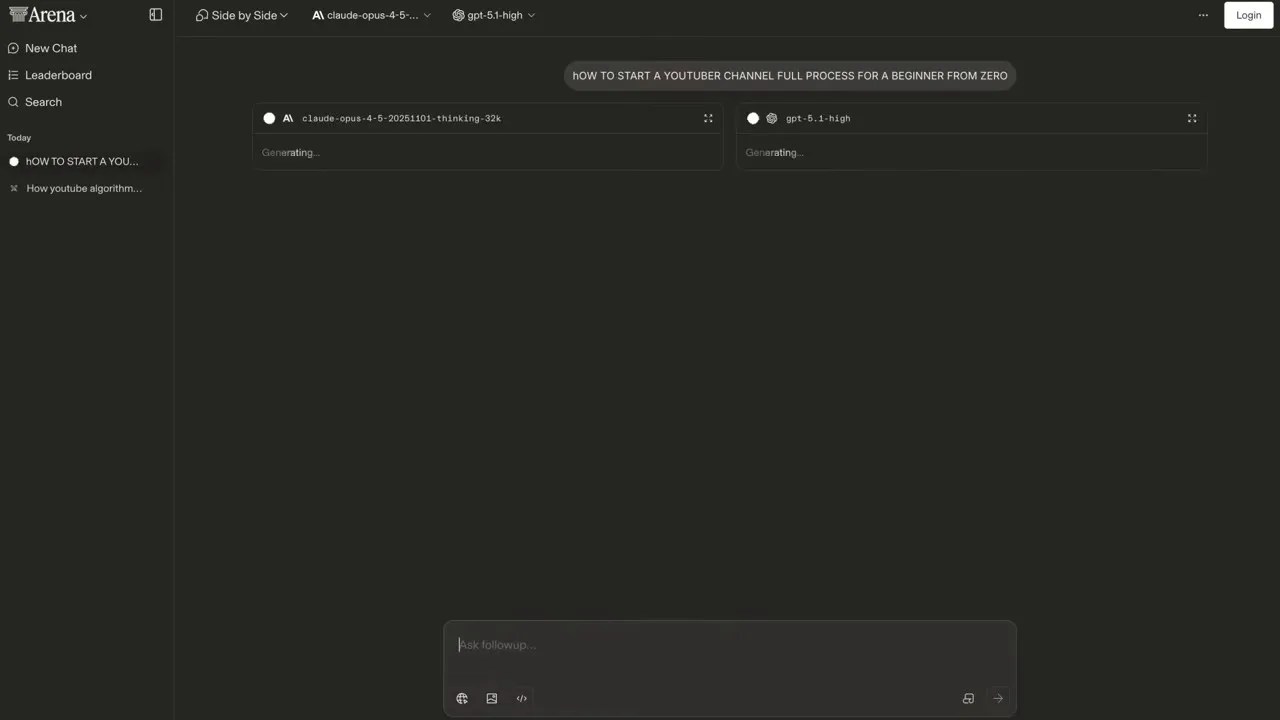
Running a benchmark in Arena AI: Comparing real-time outputs side-by-side to see which model handles complex prompts with better nuance.
The interface is simple yet incredibly powerful. You select the two models you want to pit against each other—for example, contrasting the creative depth of Anthropic’s Claude 4.5 with the raw logical processing of OpenAI’s GPT 5.1. You input a single prompt into the shared text area, and both models generate their responses simultaneously in real-time.
When I tested this by asking for a step-by-step roadmap on “How to start a YouTube channel from scratch,” the difference in model personalities became instantly clear. While both started strong, Claude pulled ahead in the final stretch by delivering an actionable, structured checklist that GPT completely omitted.
With Arena AI, you don’t just get a side-by-side comparison for text; you can experiment with coding tasks, image generation, and live web search. It saves you an immense amount of money while giving you a direct, unfiltered look at which model actually deserves your trust for specific tasks.
7. Napkin AI: Kill the Boring Text and Let Visuals Do the Talking
Whether you are a student preparing a slide deck, a teacher designing a lesson plan, or a startup founder pitching to investors, you face the same harsh reality: people hate reading walls of text. But unless you are a professional graphic designer, spending hours on Canva trying to piece together a halfway-decent infographic is a massive waste of time.
Napkin AI is arguably one of the best free AI tools for educators and content creators because it completely automates visual storytelling. It acts as an instant translator that turns dry, text-heavy information into engaging, professional vector graphics.
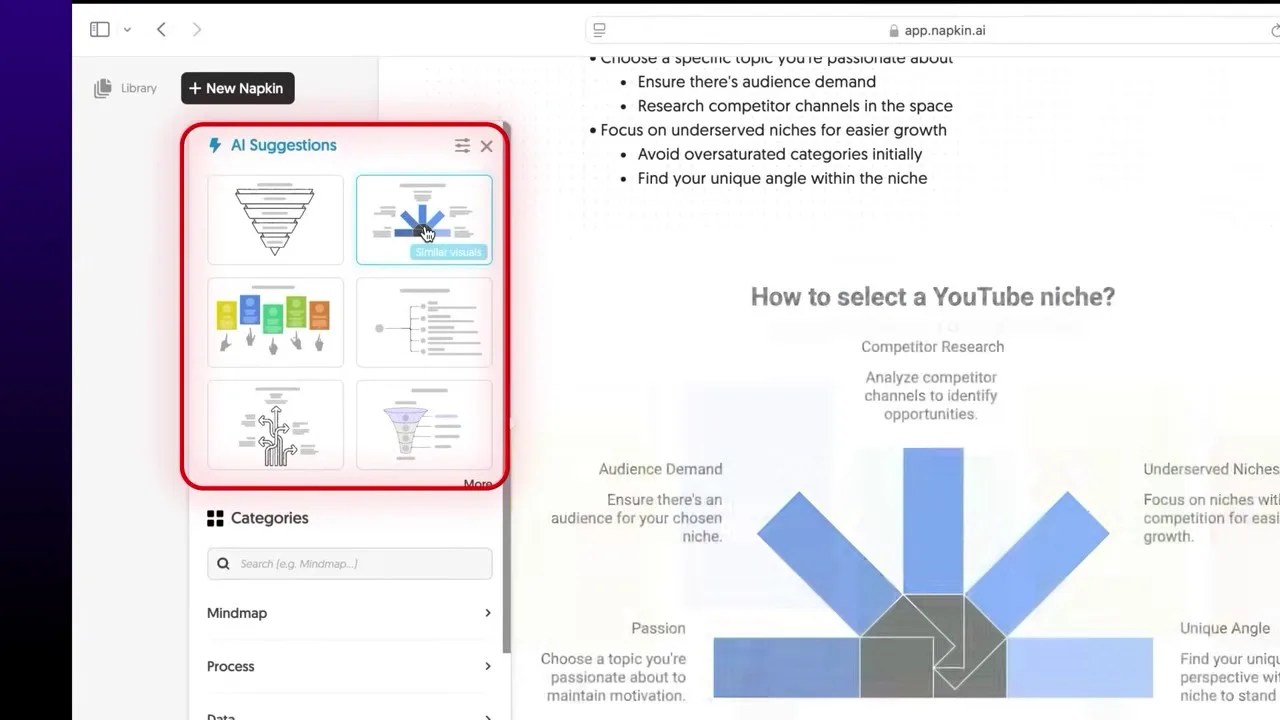
Napkin AI turning a standard text outline into a visually engaging, custom-designed infographic in a matter of seconds.
You can start by pasting your own text, importing a PDF, or typing in a raw prompt like “How to grow on YouTube.” If you give it a prompt, the built-in AI writer will first generate a highly researched, structured blog post or outline for you.
But the real magic happens when you hover over any paragraph and click the “Generate” icon. Within seconds, Napkin AI analyzes the context of that specific paragraph and generates a custom infographic, flowchart, or diagram that visually represents the concept.
You have full creative control over the output. You can cycle through different visual styles, change the color palette to match your brand, adjust the font sizes, and even edit the shapes and connections manually. If your text contains numerical data, you can paste it in and generate sleek, clean charts instantly. What used to take an hour of tedious drag-and-drop editing now takes less than two minutes, and the entire platform is completely free to use.
8. Whisper Flow: The AI Secretary That Translates Your Stutters Into Flawless Prompts
If you use AI tools daily, you know that typing out complex, highly detailed prompts can quickly become a chore. Your fingers get tired, and you end up writing shorter, lower-quality prompts just to save time.
Now, you might think: “Why not just use the standard voice dictation built into ChatGPT?”
The problem with standard speech-to-text is that humans don’t speak in perfect, polished sentences. We stutter, we pause to think, we repeat ourselves, and we use filler words like “um” and “uh.” If you use standard dictation, the AI captures all of that conversational garbage, resulting in a messy, confusing prompt.
This is where Whisper Flow completely changes the game.
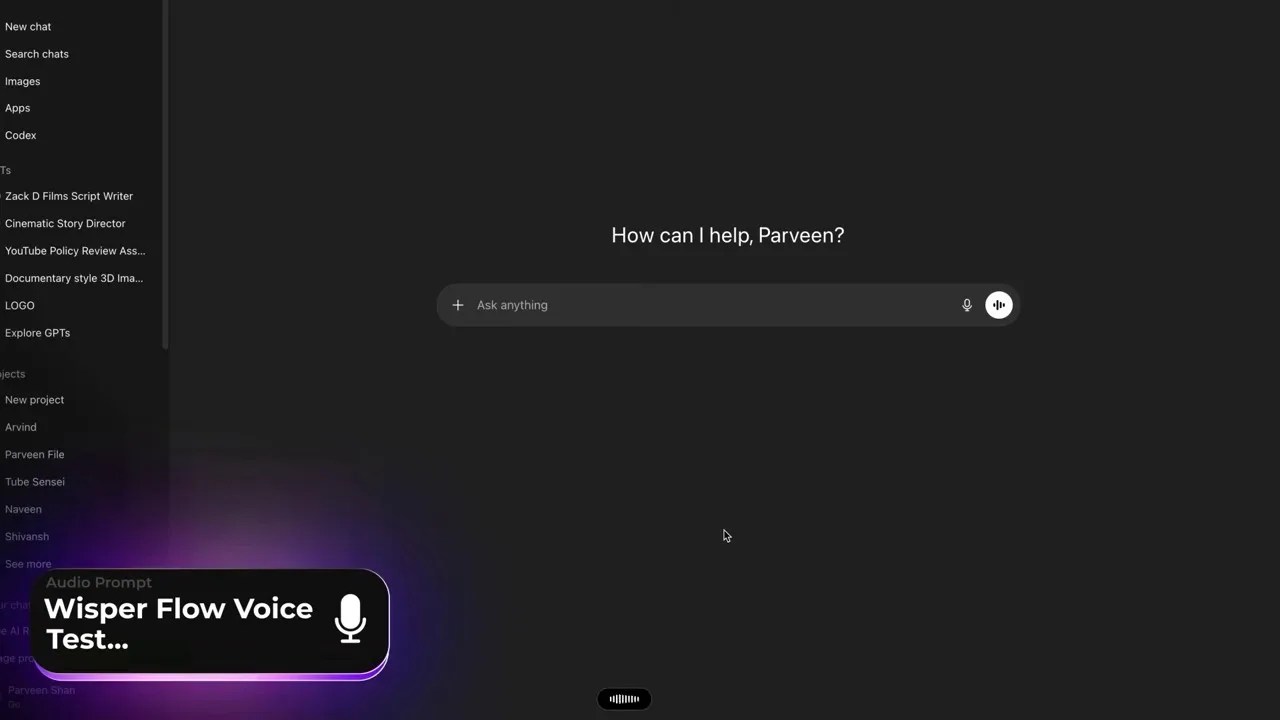
Whisper Flow’s smart transcription engine filtering out stutters, filler words, and repetitions to deliver a clean, perfectly structured prompt.
Whisper Flow is a highly intelligent speech-to-text editor that doesn’t just transcribe your voice—it understands your *intent*.
When I tested it, I deliberately spoke with heavy hesitation. I paused mid-sentence, repeated phrases multiple times, acted confused, and stumbled over my words. A standard dictation tool would have recorded a chaotic, unreadable mess.
Whisper Flow, however, instantly recognized the stutters and repetitions. It filtered out the noise, smoothed over the awkward transitions, and consolidated the rambling speech into a highly polished, professional prompt. Even better, if you speak in a different language or a mixed dialect, it can automatically translate and refine your thoughts into clear, structured English. It is the ultimate hands-free prompt companion that keeps your workflow moving at the speed of thought.
But as incredible as these productivity boosters are, there is one final boundary that free AI tools have struggled to cross: real-time, interactive multimodal collaboration. Our next tool changes that entirely…
Whisper Flow’s ultimate strength lies in its ability to ignore your human imperfections. It is trained to filter out the false starts, the awkward pauses, and the verbal tangents, capturing only the core meaning of your words and translating them into a highly structured, clean format. Whether you are dictating a video script, drafting a detailed prompt, or writing a professional email, it is easily the most robust speech-to-text tool on the market today. And yes, it is completely free.
But what if you want to create something more artistic than text? What if you want to write a full song with professional-grade vocals and instrumentation, without knowing how to play a single note?
9. Sonoto AI: Unlimited, Copyright-Free Music Generation
If you look at social media platforms right now, you will notice a massive surge of creators going viral using AI-generated music. From background tracks to full-blown parody songs, AI music is taking over. For a long time, the gold standard for this was Suno AI. But Suno is a freemium tool with tight generation limits, and if you want to use the music commercially, you have to pay for a premium subscription.
Sonoto AI emerges as the ultimate free alternative. It offers unlimited music generation and—crucially—allows you to use your generated tracks commercially. This means you can upload your songs to Spotify, use them in monetized YouTube videos, or feature them in Instagram Reels without worrying about copyright strikes.
The platform is incredibly simple to navigate. Once you log into the dashboard and switch to “Advanced Mode,” you are given three options: let the AI write the lyrics for you, upload your own custom lyrics, or generate an instrumental track with no vocals at all.
You can then customize the genre, mood, and vocal style. For example, by simply typing “female voice, melodic pop song” and clicking generate, the engine produces two distinct, high-fidelity musical variations in seconds, complete with rich harmonies, realistic vocal inflections, and professional-grade mixing.
Whether you want to create a catchy theme song for your brand, background music for your content, or just experiment with different musical styles, Sonoto AI offers studio-quality output without costing you a single dime.
10. Google AI Studio (Real-Time): Your Living, Breathing Digital Jarvis
We have saved the absolute best for last. While Google AI Studio hosts a massive suite of powerful developer tools, there is one specific feature that will completely blow your mind: the Real-Time Playground.
This isn’t just another chatbot where you type a prompt and wait for a response. This is a living, breathing digital assistant that can see, hear, and interact with your digital environment in real-time. It is the closest thing we have ever had to Tony Stark’s Jarvis.
To access this feature, you head over to Google AI Studio, navigate to the Playground category, and select “Real-Time.” You will be presented with three interactive options: Talk, Webcam, and Share Screen.
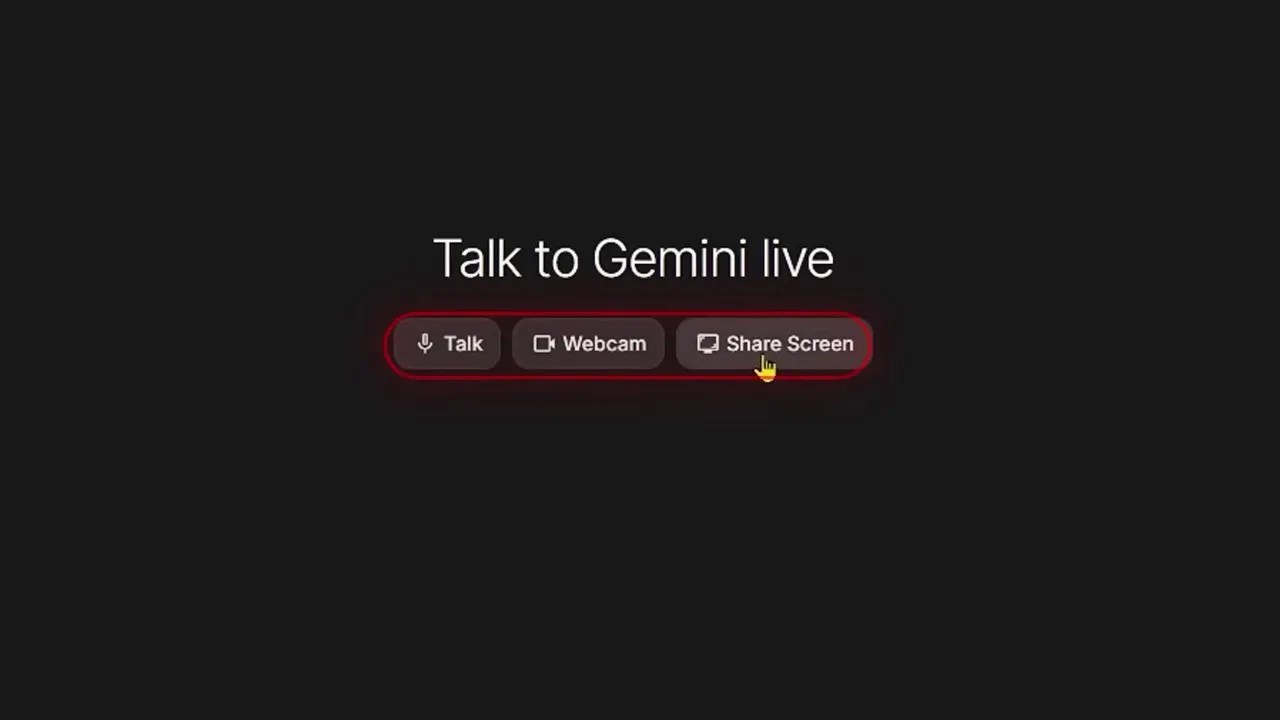
The Google AI Studio Real-Time playground, showcasing the active screen-sharing capability that allows the AI to collaborate with you on live tasks.
When you enable the Share Screen feature, you grant the AI the ability to see exactly what is happening on your monitor in real-time. It doesn’t just take static screenshots; it actively watches your workflow.
If you are a programmer writing code, Google AI can watch you debug in real-time and speak up when it spots a syntax error. If you are a financial analyst working on a complex Excel spreadsheet, it can guide you through complex formulas as you type. If you are a student struggling with a difficult physics problem, you can share your digital textbook, and the AI will walk you through the solution step-by-step, explaining the concepts out loud.
It is an incredibly fluid, hands-free collaborative experience that completely redefines the relationship between humans and artificial intelligence. Out of all the tools we have looked at, this is the one that truly feels like a leap into the future.
Wrapping Up: Smart Work Beats Hard Work
The AI landscape in 2026 is no longer about who has the deepest pockets to pay for monthly subscriptions. It is about who knows how to leverage the best free AI tools to automate the boring stuff, supercharge their creativity, and streamline their productivity. From NoteGPT’s massive workspace to Google AI Studio’s real-time assistance, the power to build, create, and scale is now completely free and accessible to anyone with an internet connection.
Stop paying for tools that you can easily replace with these free alternatives. It’s time to work smarter, save your hard-earned money, and let these digital assistants do the heavy lifting for you.
Frequently Asked Questions (FAQ)
1. Are these “free” AI tools actually free, or are there hidden paywalls?
All the tools featured in this list offer incredibly robust free tiers that do not require a credit card. While some tools like NoteGPT have high usage limits (like 100,000 words for text-to-speech), their free allowances are more than generous enough for everyday personal and professional use without ever needing to upgrade.
2. Can I legally monetize the music generated by Sonoto AI?
Yes! One of the biggest advantages of Sonoto AI over other platforms is that it grants commercial rights to the music you generate on its free tier. You can use the tracks in monetized YouTube videos, social media campaigns, or even upload them to streaming platforms without copyright worries.
3. Is it safe to share my screen with Google AI Studio’s Real-Time feature?
Google AI Studio is designed as a developer playground, meaning you have direct control over what you share. However, because it processes your screen contents in real-time, it is highly recommended to close any windows containing sensitive personal information, passwords, or private financial data before starting a screen-share session.