First, AI came for the writers. We watched in real-time as ChatGPT redefined copywriting. Then, it came for the coders, turning complex software development into a game of natural language prompts. But through all this disruption, there was one sacred territory we thought was relatively safe: pure, raw human creativity.
Branding, high-end studio photography, ad campaign design, social media curation—the entire creative stack that businesses spend thousands of dollars on to survive and grow. We assumed a machine could never replicate the nuanced touch of a veteran creative director. Well, Google just quietly entered the chat, shattered that assumption, and somehow made the solution completely free.
It’s called Google Pomelli AI, and it is a tool designed to do in a few clicks what usually takes entire creative departments weeks of back-and-forth to build.

No rough drafts here. These are the highly polished, production-ready assets generated by Google Pomelli AI right out of the gate.
If you’ve played around with mainstream AI design tools, you know the drill: they give you a rough, slightly uncanny draft that still requires hours of manual tweaking in Photoshop to be usable. But when I first ran a live brand through Google Pomelli AI, the outputs made me pause. For the first time, I had to seriously ask myself: How are traditional creative agencies going to compete with this?
In this multi-part guide, I’m taking you under the hood of this powerful engine. By the end of this journey, you’ll know exactly how to generate a complete website, a professional brand guide, high-converting ad campaigns, and hyper-realistic product photoshoots. Best of all, there is a hidden setting at the very end that pushes all of these assets directly into Google Ads—creating a seamless, automated marketing pipeline inside a single, free tool.
The Friction of Brand Building: The Old Way vs. The Pomelli Way
Let’s talk about the cold, hard truth of starting or scaling a business. Building a brand identity is a logistical nightmare. In the traditional landscape, you have to hire a small army of specialists:
- A graphic designer for your logo, brand guidelines, and color palettes.
- A copywriter to define your brand voice, taglines, and messaging.
- A commercial photographer and models for high-quality product shots.
- An agency to tie it all together into a cohesive advertising campaign.
- A web developer to build and launch your digital storefront.
For small business owners, solo founders, or even agile marketing teams, managing five different freelancers, paying thousands of dollars upfront, and enduring weeks of sluggish feedback loops is why marketing never gets done. It’s simply too slow and too expensive.
This is the exact pain point Google Pomelli AI aims to solve. Instead of starting from scratch with generic templates, you feed the AI just one thing: your website link.
The AI then acts like a senior creative director. It crawls your live site, extracts your exact brand colors, matches your typography, analyzes your tone of voice, and cataloges your products. It then turns those insights into ready-to-post campaign posters, realistic lifestyle photoshoots, brand books, and websites that look like they were custom-designed for *your* brand—not some cookie-cutter AI output.
| Workflow Stage | The Traditional Route | The Google Pomelli AI Route |
|---|---|---|
| Time to Launch | 2 to 6 Weeks | Under 10 Minutes |
| Total Cost | $2,000 – $10,000+ | $0 (100% Free) |
| Execution | Managing 5+ freelancers/agencies | Single-input AI generation |
| Brand Consistency | Hard to align across different assets | Unified “Business DNA” engine |
But what if you don’t even have a website yet? Don’t worry. Pomelli allows you to build a brand completely from scratch using nothing more than a few raw product images. We will explore both paths, but let’s start with the automated website scraping path to see how this core engine operates under pressure.
Getting Started: Navigating the Pomelli Interface
When you first land on the Pomelli platform, you are greeted with a clean, minimalist interface that promises to “easily generate on-brand content for your business.” Clicking “Get Started” takes you directly to the onboarding sequence.
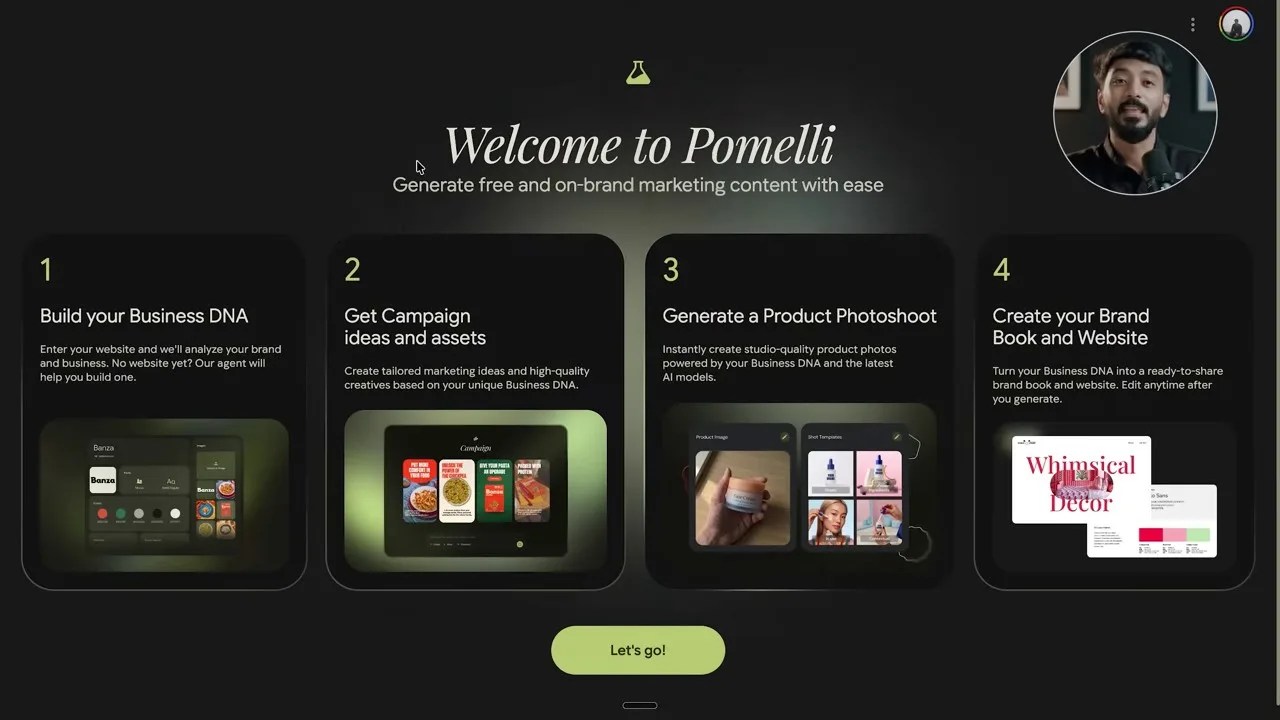
The onboarding screen highlights the core pillars: Business DNA, Campaign Generation, Product Photoshoots, and Brand Books/Websites.
As shown above, the tool organizes its entire value proposition into four clear, actionable capabilities:
- Build your Business DNA: The foundation of your brand identity.
- Get campaign ideas and assets: Instantly generated, highly contextual marketing creatives.
- Generate a product photoshoot: Placing your products on realistic, AI-generated models in breathtaking locations.
- Create your brand book and website: Standardizing your brand rules and launching a web presence.
Once you click “Let’s Go,” the tool prompts you for your website URL. This is where the magic begins.
Putting Pomelli to the Test: Extracting H&M’s Brand DNA
To see if Google Pomelli AI can actually handle complex, real-world enterprise branding, I decided to bypass simple test cases and throw it straight into the deep end. I chose H&M as our test subject.
H&M is a global retail giant with a massive product catalog, a highly specific visual aesthetic, and a heavy website architecture that would easily choke a low-quality wrapper tool. I copied the H&M homepage URL, pasted it into the Pomelli input box, and hit continue.
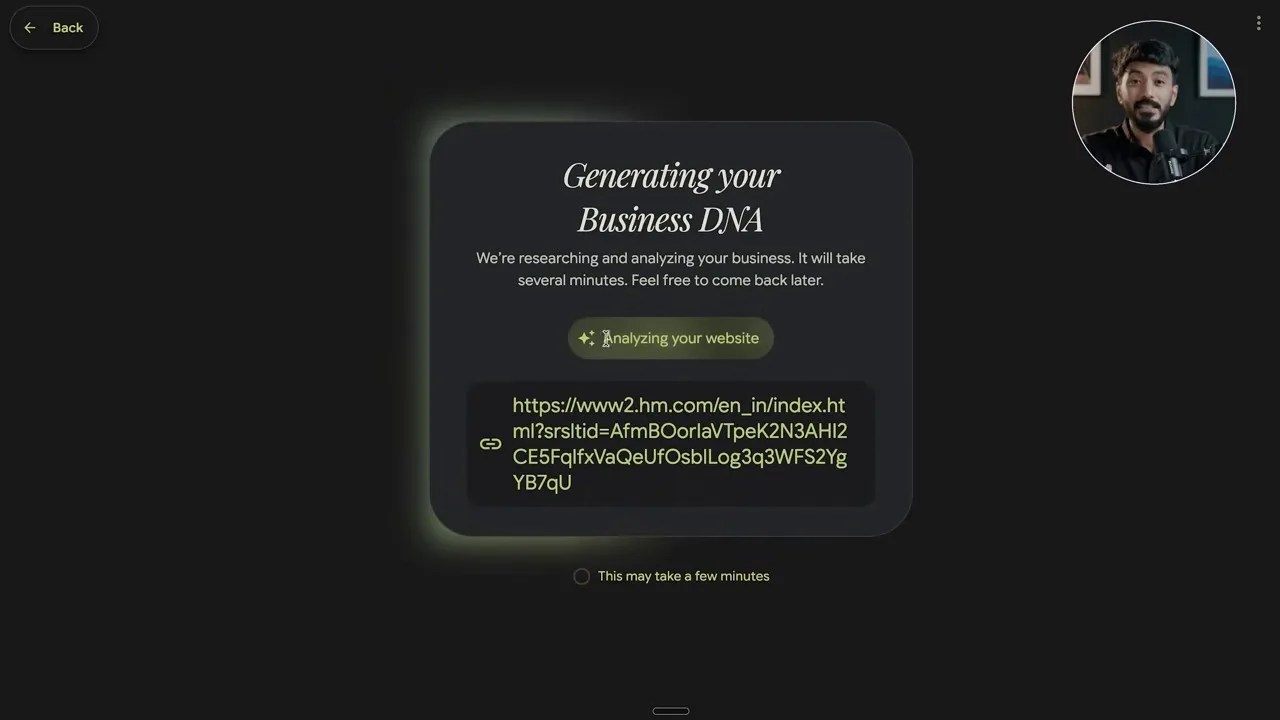
The live status dashboard showing Pomelli actively dissecting H&M’s online presence in real-time.
What followed was a fascinating look at how modern AI processes branding. Instead of a generic loading spinner, Pomelli gives you a live status screen showing every analytical step of its process. It actively crawls and checks off tasks like:
- Analyzing website architecture and gathering exact brand colors
- Determining visual aesthetics and matching brand values
- Identifying official brand typography and pulling product images
- Summarizing the core business model, finding the logo, and decoding the tone of voice
Depending on how heavy the target website is and current server loads, this entire ingestion process takes just a few minutes. For a tool doing the heavy lifting of a multi-disciplinary brand strategy team, that is mind-bogglingly fast.
The Business DNA Dashboard: Your Brand’s New Home Base
When the analysis is complete, you are redirected to the **Business DNA Dashboard**. This is your command center. Everything you generate from this point forward will reference this centralized identity, ensuring you never get off-brand colors or weird, out-of-character copy.
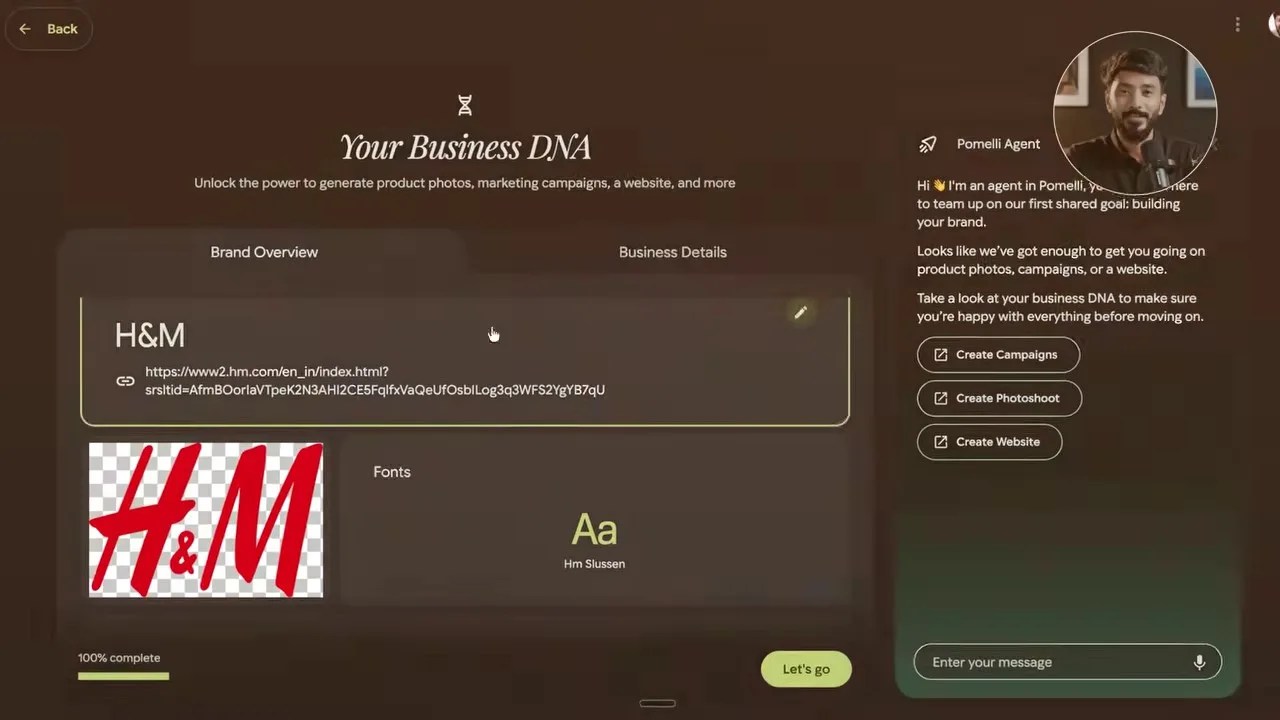
The generated Business DNA Dashboard for H&M, complete with color hex codes, fonts, brand values, and an incredibly accurate AI-generated tagline.
The accuracy here is startling. For H&M, Pomelli generated the tagline: “Fashion and quality at the best price in a sustainable way.” If you look up H&M’s actual, real-world corporate positioning statement, it matches almost word-for-word.
On the right side of the dashboard sits the Pomelli Agent Panel—a direct conversational chat interface that lets you trigger campaigns, prompt new photoshoots, or modify your website with simple, text-based commands. We’ll leave the agent panel closed for now, as we’ll be putting it through its paces with a second, custom brand built from scratch later in this guide.
Once you click “Let’s Go” at the bottom of the dashboard, a prompt opens up presenting your next steps: Campaigns, Photoshoots, Websites, or Brand Books. Let’s start with the most immediate revenue-generator for any business: Campaigns.
Instant Campaigns: Autopilot Creative Asset Generation
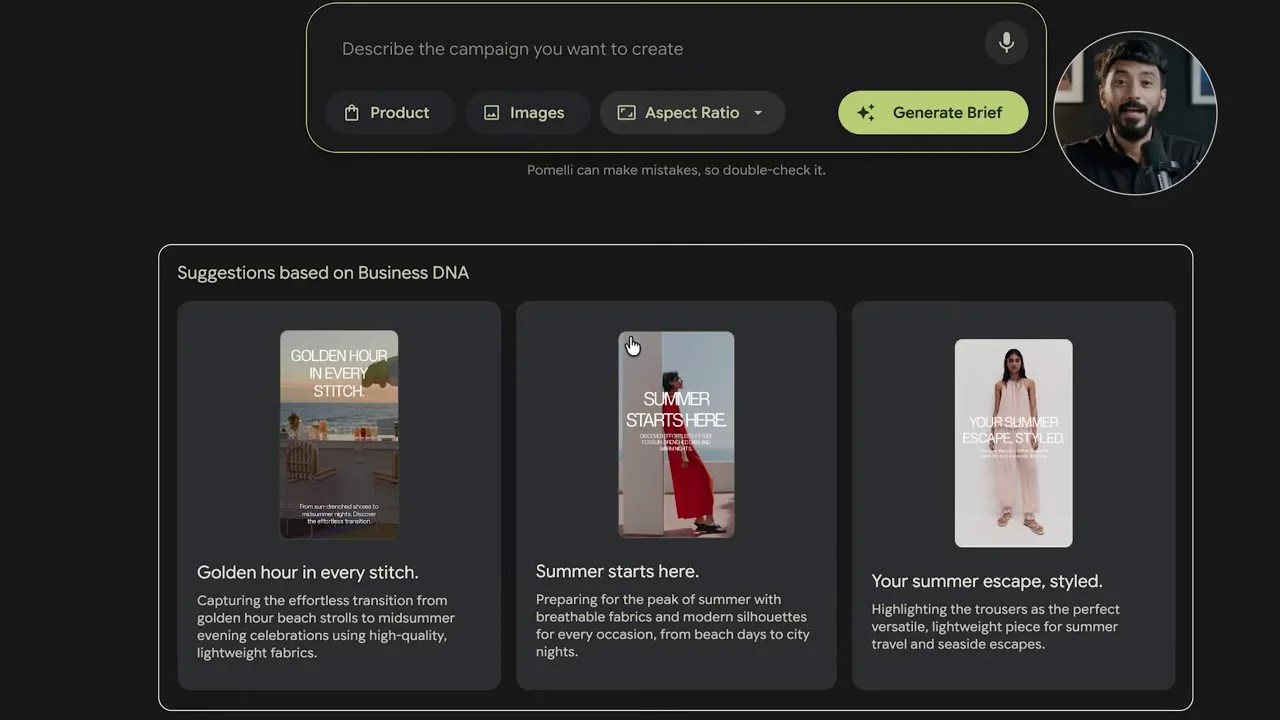
The moment you click into the Campaigns tab, you realize Pomelli isn’t waiting for you to tell it what to do. Based on the H&M Business DNA it just analyzed, the AI has already pre-generated three highly relevant, seasonal campaign concepts:
- Summer Starts Here
- Golden Hour in Every Stitch
- Your Summer Escape Styled
By selecting a concept—for example, “Summer Starts Here”—the engine takes less than ten seconds to produce four fully realized vertical poster designs.
The campaign builder displaying vertical ad creatives complete with automated copy, product integration, and a visual editing sidebar.
These aren’t just generic stock photos with text slapped on top. Pomelli pulls actual product images directly from the scraped H&M catalog, places them into professional layouts, and writes contextual, on-brand headlines like “From beach to city nights.”
If you click on any of these posters, a robust editing sidebar slides open. From here, you have granular control over the creative:
- Copywriting: Modify the headers, descriptions, and fonts on the fly.
- Call To Action (CTA): Toggle a call-to-action button (like “Shop the Edit”) on or off, customize the button text, font, and link it directly to your product page.
- Fix Layout: This is a massive timesaver. If your custom text looks cramped or misaligned, clicking “Fix Layout” instantly recalibrates the visual spacing, font sizing, and composition automatically.
“The ‘Fix Layout’ button is a subtle but revolutionary feature. It completely eliminates the tedious, pixel-pushing micro-adjustments in Canva or Photoshop that drain hours of a marketer’s day. It just works.”
High-end, professional campaign variations generated instantly for a specific H&M Linen Collection prompt.
You can also use the version history toggle at the top of the editor to compare your manual edits against the AI’s original generation. Once you are satisfied, a quick click of the download arrow exports a high-resolution, production-ready PNG straight to your local drive, ready to be deployed across your social channels or ad networks.
But what if you want to run a highly specific campaign that the AI didn’t pre-generate? That’s where the Catalog and Assets tabs in the left sidebar come into play, allowing you to build completely custom, prompt-driven campaigns using your scraped product inventory.
Training the Beast: Managing Your Catalog and Visual Assets
Before we write our first custom prompt, let’s look closer at those two tabs in the left sidebar: Catalog and Assets. These are not just passive folders; they are the gears that keep the Pomelli engine running smoothly.
The Catalog tab displays every single product Pomelli successfully extracted from your website. But it goes a step further: it automatically generates clean, optimized names and descriptions for each item. If you click on any specific product in this grid, you can immediately launch a dedicated campaign or a targeted photoshoot for that exact item without having to navigate back to the main dashboard. It’s an incredibly intuitive, product-first workflow.
Right next to it is the Assets tab. This is where Pomelli stores every logo variant, lifestyle image, and product shot it scraped from your live site. Here is a pro-tip that most casual users overlook: you can delete assets you don’t like.
Let’s say your website still has some outdated winter banner designs or low-res product shots from three years ago. By manually deleting those from the Assets tab, you are quietly training Pomelli’s neural network to ignore them. Over time, this refines the AI’s understanding of your brand, ensuring future generations only pull from your absolute best, most current visual assets.
Crafting Custom Campaigns: The Spring Linen Test
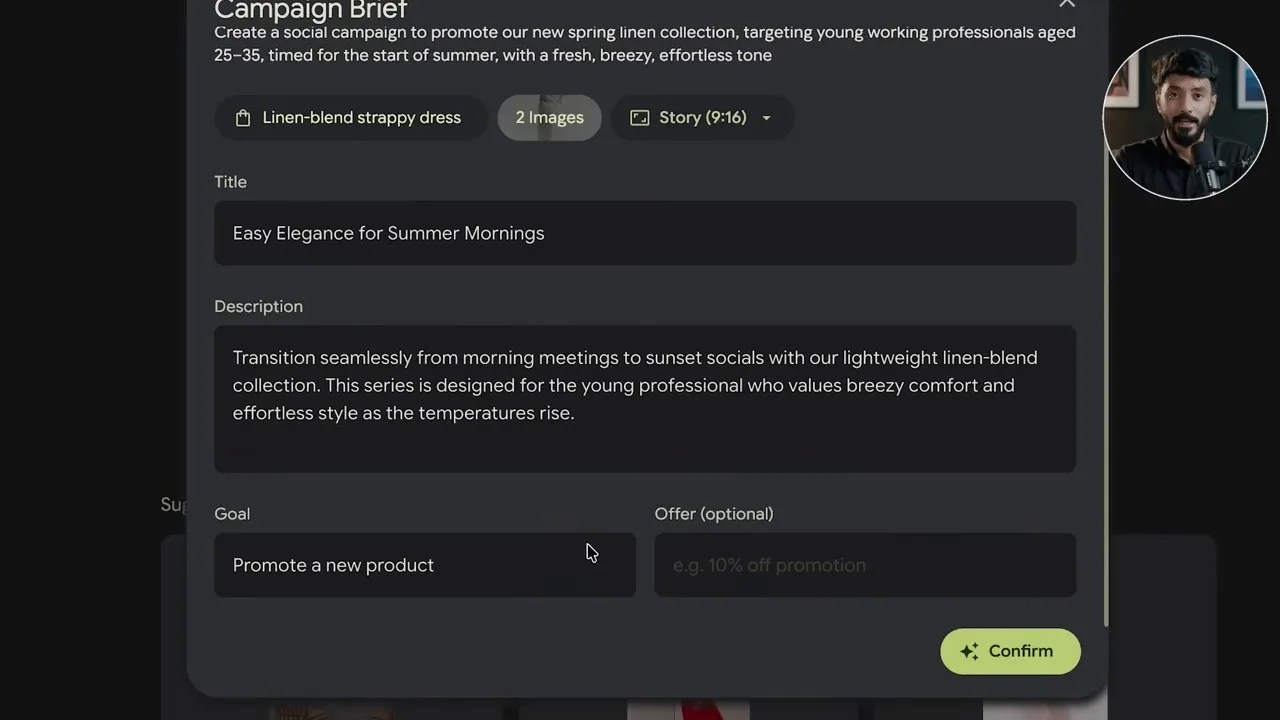
The pre-generated campaigns are great, but the real power of Google Pomelli AI is unlocked when you feed it a custom creative brief. To test this, I typed a highly specific, realistic marketing prompt into the top bar:
“Create a social campaign to promote our new spring linen collection, targeting young working professionals aged 25 to 35, timed for the start of summer with a fresh and breezy tone.”
Before hitting generate, the tool lets you choose your desired aspect ratio (perfect for tailoring assets to Instagram Stories, TikTok, or landscape web banners) and manually select up to six specific products from your catalog to feature in the creative layouts.
Once you click “Generate Brief,” Pomelli doesn’t just blindly spit out images. Instead, it acts like a professional agency strategist and builds a structured campaign brief first. This brief outlines the campaign title, a detailed description, the primary marketing goal, and any promotional offers you might want to run. You have full editorial control to tweak this strategy before locking it in.
The finalized campaign assets. Pomelli captured the ‘fresh and breezy’ tone perfectly, matching the typography and color styling to H&M’s high-end aesthetic.
After clicking confirm, the engine generates four complete, ready-to-post creatives. The results are stunning. The layout structures feel deliberate, the copy is punchy, and the integrated catalog products blend seamlessly into the design. Need more variations? Simply click “Add Creative,” and the engine will generate new layouts that automatically inherit the exact same campaign brief and visual guidelines.
The Photoshoot Tab: Studio-Quality Imagery on a Zero-Dollar Budget
Let’s face it: organizing a professional commercial photoshoot is a massive logistical headache and a cash drain. You have to book a studio, hire models, manage lighting, handle post-production, and pray that the weather cooperates if you are shooting outdoors.
This is where Pomelli’s Photoshoot feature becomes an absolute game-changer. By clicking “Create a product photoshoot” in the left sidebar, you can select any product image from your imported catalog or upload a raw file directly.
Once your product is selected and your aspect ratio is locked in, you gain access to the **Template Gallery**. Pomelli categorizes these templates by industry, including Fashion, Beauty, Home, and Consumables. The crown jewel of this feature is the “Model Try-On” template.

A photorealistic AI model wearing a catalog product. The lighting, shadows, and fabric draping look incredibly natural and studio-grade.
When you hit generate, Pomelli’s rendering engine takes about sixty seconds to output four distinct variations of your product being worn or used by photorealistic AI models.
What blew me away here was the attention to physical consistency. The lighting on the model matches the ambient light of the background, the shadows fall naturally, and the product itself integrates seamlessly without that cheap, copy-pasted “photoshopped” look. With one click, you can save these high-res assets or push them straight into a brand-new marketing campaign.
The Brand Book: Codifying Your Identity for Scale
As your business grows, you will eventually need to hand off tasks to freelancers, agencies, or new employees. The biggest bottleneck in this transition is maintaining brand consistency. Without clear rules, your visual identity quickly becomes messy and disjointed.
Traditionally, you would pay a brand strategist thousands of dollars to write a comprehensive Brand Book. Pomelli does it in under a minute.
By navigating to the Brand Book tab, the tool asks you to select a cover style (which you can let the AI generate, choose from your catalog, or upload yourself) and pick a handful of supporting lifestyle and product images to populate the inner pages.
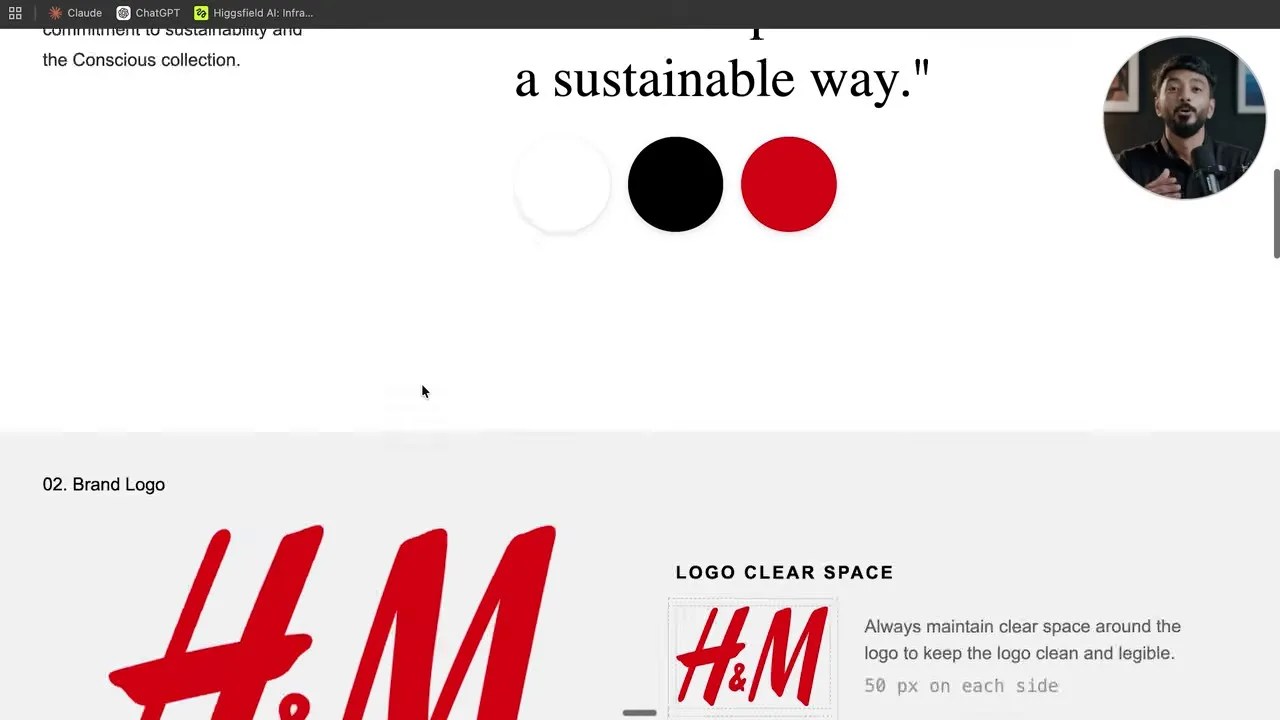
A clean, professionally structured Brand Book generated by Pomelli, ready to be exported as a PDF or shared via a live web link.
The generated Brand Book is incredibly thorough, automatically organizing your brand guidelines into six core pillars:
- Brand Overview: A high-level summary of your business mission.
- Brand Logo: Clear rules regarding spacing, background contrast, and minimum scaling sizes.
- Typography: Your designated heading and body fonts.
- Color Palette: Your primary and secondary brand colors complete with exact Hex, RGB, or CMYK codes.
- Imagery Guidelines: Rules defining the visual mood and composition of your brand’s photography.
- Brand Voice: A guide on how your brand should sound to your audience (e.g., professional, playful, authoritative).
You can download this entire document as a polished PDF, or toggle the “Publish” button to generate a live, shareable link. If you ever update your brand colors or logos in the future, updating the master file inside Pomelli will automatically update the live link—no need to resend updated PDFs to your team.
Launching a High-Converting Landing Page in 60 Seconds
Website builders like Shopify or Webflow are incredibly powerful, but they still require a steep learning curve or significant development hours to design something that doesn’t look like a basic template.
Pomelli approaches web design from a completely different angle. Because it already deeply understands your “Business DNA”—your colors, fonts, tone of voice, and product catalog—it can generate a fully customized, responsive landing page with a single click.
When you click the Websites tab, the engine immediately begins constructing a site in the background. Within a minute, you are presented with a live, interactive editor. For our H&M test, Pomelli built a clean, modern landing page featuring:
- A bold, high-impact Hero Section with a clear value proposition.
- An interactive Product Grid displaying real catalog inventory.
- A stylized Text Block explaining the brand’s sustainable mission.
- A visual Feature Row highlighting specific collections.
- A beautiful, large-format Image Gallery at the footer.
Inside the editor, you can use conversational AI prompts to instantly swap out sections, rewrite copy, or alter layouts. Once you are happy with the preview, toggling the “Publish” button pushes the site live on a hosted Pomelli URL. It is fully optimized for both desktop and mobile viewports, giving you an instant, zero-cost digital storefront.
Starting From Scratch: The “No Website” Path
Up to this point, we’ve assumed you already have an active, established website that Pomelli can scrape. But what if you are launching an entirely new brand from scratch? What if you are a freelancer working for a client who hasn’t built their site yet? Or what if you just want to rapidly prototype a business idea over the weekend to see if it has legs?
This is where the second path comes in—a path that most online tutorials completely ignore.
If you return to the Pomelli home screen and select “No Website Yet,” you are presented with two options: build your brand identity using a pre-made Pomelli template, or build it completely from scratch using the interactive Pomelli Chat Agent.
To put this to the test, let’s build a fictional, handcrafted luxury jewelry brand called Gulabi, based in the historic city of Jaipur, India.
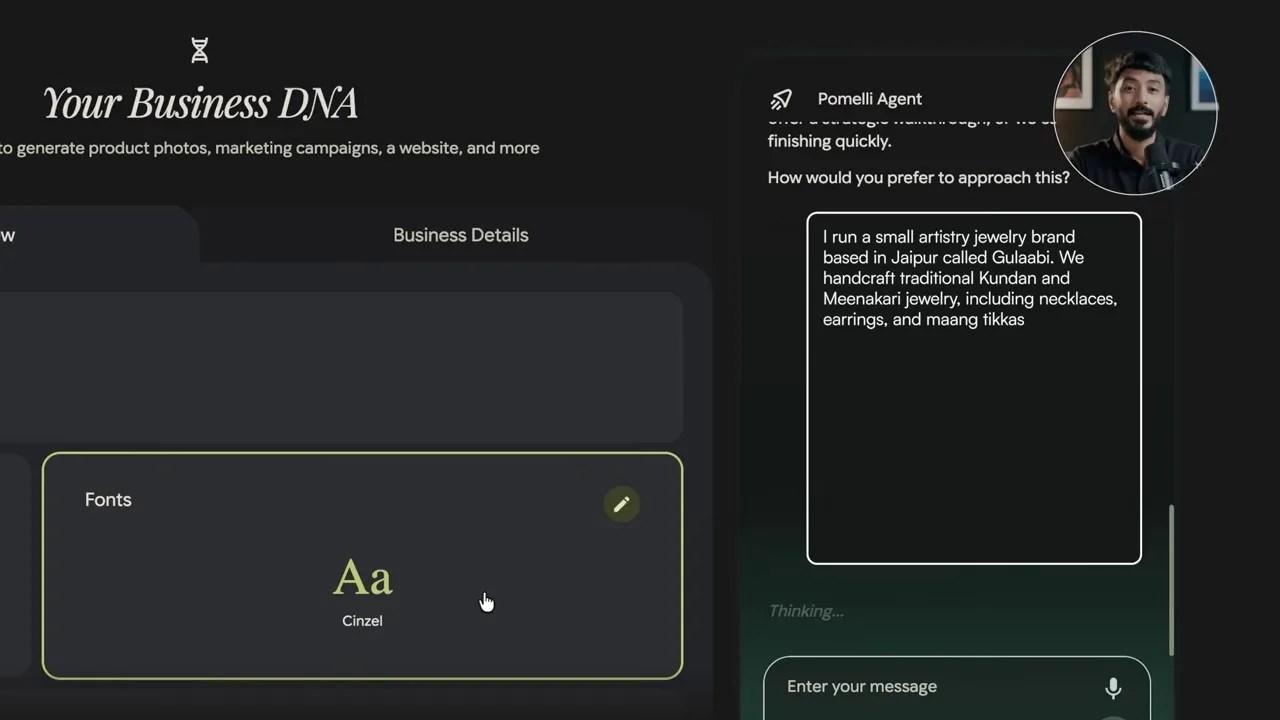
Using the Pomelli Chat Agent to upload raw product images and define the brand identity for our fictional jewelry startup, Gulabi.
The Pomelli Agent opens as a conversational sidebar on the right side of your screen. The very first thing it asks you to do is upload any raw assets you have—whether that’s a rough logo sketch, a mood board, or simply a few raw camera shots of your products. From there, the conversational AI will guide us through a step-by-step branding workshop to construct our business DNA from the ground up.
Feeding the Chat Agent: Defining Gulabi’s Regal Identity
First, the agent asks you to feed it some raw visuals. If you don’t have high-end product photography yet, don’t let that stop you. You can quickly generate a few conceptual product mockups using Midjourney or ChatGPT’s image generator and drop them straight into Pomelli. For Gulabi, I dragged eight photos of handcrafted Kundan and Minakari jewelry directly into the chat.
The Pomelli Chat Agent analyzing our uploaded jewelry images in real-time, extracting intricate design details, color values, and stylistic cues.
Once Pomelli finished analyzing the jewelry images, a button appeared: “Generate Business DNA.” After clicking it, I wanted to ensure the AI captured the precise emotional and cultural weight of the brand. I fed the chat agent a highly descriptive prompt:
“I run a small artistry jewelry brand based in Jaipur called Gulabi. We handcraft traditional Kundan and Minakari jewelry, including necklaces, earrings, and maang tikkas using designs rooted in classic Rajasthani artistry. Our brand feels regal, handcrafted, and timeless. Our colors are deep emerald green, royal gold, and Jaipur pink. Our tone is elegant, warm, and proud of its heritage. We sell to women who want statement jewelry for weddings, festivals, and special occasions.”
The moment I hit send, the entire Business DNA dashboard updated in real-time. The visual aesthetic shifted, the brand values aligned with heritage craftsmanship, and the palette locked into emerald green, royal gold, and Jaipur pink. The agent then served up three tagline options. The winner? “Timeless Rajasthani craftsmanship, worn with pride.” It felt incredibly authentic.
Crafting the Festive Launch Campaign
With Gulabi’s brand DNA locked in, I hopped over to the Campaigns tab to build a targeted launch. I skipped the pre-generated ideas and prompted the campaign builder directly:
“Create a festive campaign to promote our handcrafted Kundan necklace sets targeting women shopping for weddings and Diwali with a regal and elegant tone that celebrates traditional Jaipur craftsmanship.”
I selected a 9:16 aspect ratio for an Instagram Story campaign. Within seconds, Pomelli drafted a structured marketing brief, and upon my approval, generated four high-end creative assets.
The results were stunning. One of the variations featured a photorealistic Indian model styled in traditional attire, wearing the exact Kundan necklace I had uploaded earlier, set against a beautifully integrated backdrop with elegant typography reading “Timeless Jaipur Artistry.” The other three layouts were equally regal, clean, and immediately ready for social media deployment.
Generating the Gulabi Photoshoot, Brand Book, and Website
Next, I tested the Photoshoot tab with a pair of raw earring images. Pomelli placed the earrings onto photorealistic Indian models. In one generation, the AI even styled the model in a traditional red and magenta outfit that perfectly complemented the pink accents of our Gulabi earrings. The lighting, drape, and scale were spot-on.
For the Brand Book, I chose a rich, textured cover style that matched our heritage vibe, confirmed our supporting product images, and watched Pomelli compile a multi-page PDF guide. It laid out our typography rules, Jaipur-inspired color swatches, and tone guidelines in a layout that looked like it took a design agency weeks to format.
Finally, I clicked the Websites tab. Pomelli immediately generated a beautiful landing page featuring a legacy storytelling section, a curated product gallery of our timeless pieces, and a core values block.
Pro-Tip: Before publishing your site, make sure to head to the “Overview” section in the main taskbar and fill out your Business Details (location, operating hours, contact numbers, social links). Pomelli uses this data to automatically populate your website’s contact forms and footer, saving you from manual editing later.
The Secret Weapon: Direct Integration with Google Ads
Up to this point, Google Pomelli AI is already an incredible design asset. But this is where Google pulls off a masterstroke that completely disrupts the marketing workflow.
If you click the three dots in the top-right corner of your dashboard and select “Connected Apps” from the dropdown menu, you can link your live Google Ads account directly to Pomelli.

The Connected Apps dashboard. By linking your Google Ads account, you can deploy your generated campaigns directly to Google’s ad networks in seconds.
Once connected, you don’t need to download images, log into a separate ad manager, upload files, copy-paste headlines, or manually adjust aspect ratios. You can push your entire generated campaign—complete with all creative variations, targeted copy, and optimized layout dimensions—directly into your Google Ads campaigns right from the Pomelli interface.
If you run a marketing agency or manage multiple clients, Pomelli even lets you select the specific ad account at the time of sharing. This collapses your entire marketing funnel—from raw brand creation and product photography to ad design and paid distribution on Google Search and YouTube—into one single, streamlined, and completely free dashboard.
The Verdict: A Golden Era for Agile Brands
Let’s be honest: Google Pomelli AI is a quiet revolution. It is a massive gold mine for small business owners who have struggled to find the budget or time to execute professional marketing.
For freelancers and solo creators, it is a superpower. You can now deliver complete brand packages—logos, color palettes, professional brand books, lifestyle product photoshoots, and high-converting landing pages—to clients in a fraction of the time, without needing to hire a single extra hand.
The businesses and creators who adopt tools like Google Pomelli AI today are going to operate with the speed and polish of a massive agency, while those relying on slow, traditional back-and-forth workflows will simply get left behind.
Frequently Asked Questions (FAQ)
Is Google Pomelli AI really completely free to use?
Yes. Currently, Google has released Pomelli as a completely free tool for businesses. There are no hidden subscription tiers or paywalls for generating brand books, websites, campaigns, or photoshoots.
Can I use the AI-generated photoshoots for commercial advertising?
Absolutely. The product photoshoots and campaign creatives generated inside Pomelli are designed specifically for commercial use. Because they integrate your actual product images, they are unique to your brand and ready for social media or paid ad networks like Google Ads.
What happens if I make changes to my Brand Book after sharing the link?
One of Pomelli’s best features is its dynamic publishing. If you share a live link of your Brand Book with a designer or client and later update your brand details inside the dashboard, the live link updates automatically. You don’t need to export or resend a new file.
🎥 Watch Original Video: Google Quietly Released The BEST Free AI For Business (Pomelli) (by Vaibhav Sisinty)