Let’s be honest: the AI landscape has become a loud, crowded nightmare. Every single week, a new “revolutionary” model drops, promising to completely overhaul how we live and work. We sign up, fiddle around with it for twenty minutes, add it to our ever-growing folder of browser bookmarks, and then quietly go back to doing things the old-fashioned way. It’s exhausting.
I fell into that exact same trap. At one point, I was juggling over two dozen active subscriptions and web tabs, convinced that more tech equated to more leverage. It didn’t. It just created cognitive friction. After months of ruthless trial and error, I stripped my workflow down to the absolute bone. What I discovered is that you don’t need an army of niche applications. You actually only need a handful of essential AI tools to manage about 90% of your professional output. The secret lies in understanding the precise, unrepeatable superpower of each tool so you know exactly when to deploy which.
Here is my raw, no-nonsense breakdown of the only AI tools actually worth your time, how they stack up against each other in real-world scenarios, and how to combine them to build a frictionless daily workflow.
The Great Divide: Setting Your AI Boundaries
Before throwing any tool at a problem, we need to draw a clear line in the sand. Not all AI tools are built to do the same job. If you try to use a general-purpose reasoning engine to find a niche local restaurant, you’re going to have a bad time. Conversely, if you use a search engine to write your strategic business proposal, the output will feel dry and disjointed.
I categorize my digital toolkit into two distinct camps: Everyday AI and Specialist AI.

Everyday AI vs. Specialist AI: The fundamental mental model you need to prevent tool overload.
Everyday AI consists of your general-purpose chatbots—the “Big Three” (ChatGPT, Gemini, and Claude). These are your reasoning partners, built to brainstorm, analyze complex files, and structure ideas. Specialist AI, on the other hand, consists of tools engineered to do one highly specific thing incredibly well, such as scouring the live web for accurate data or dissecting private documents with zero risk of making things up.
The Everyday Giants: Demystifying ChatGPT, Gemini, and Claude
To the untrained eye, the Big Three chatbots look and feel virtually identical. They all have a clean text input box, a sidebar for past chats, and a friendly, conversational tone. But under the hood, their makers have optimized them for radically different use cases.
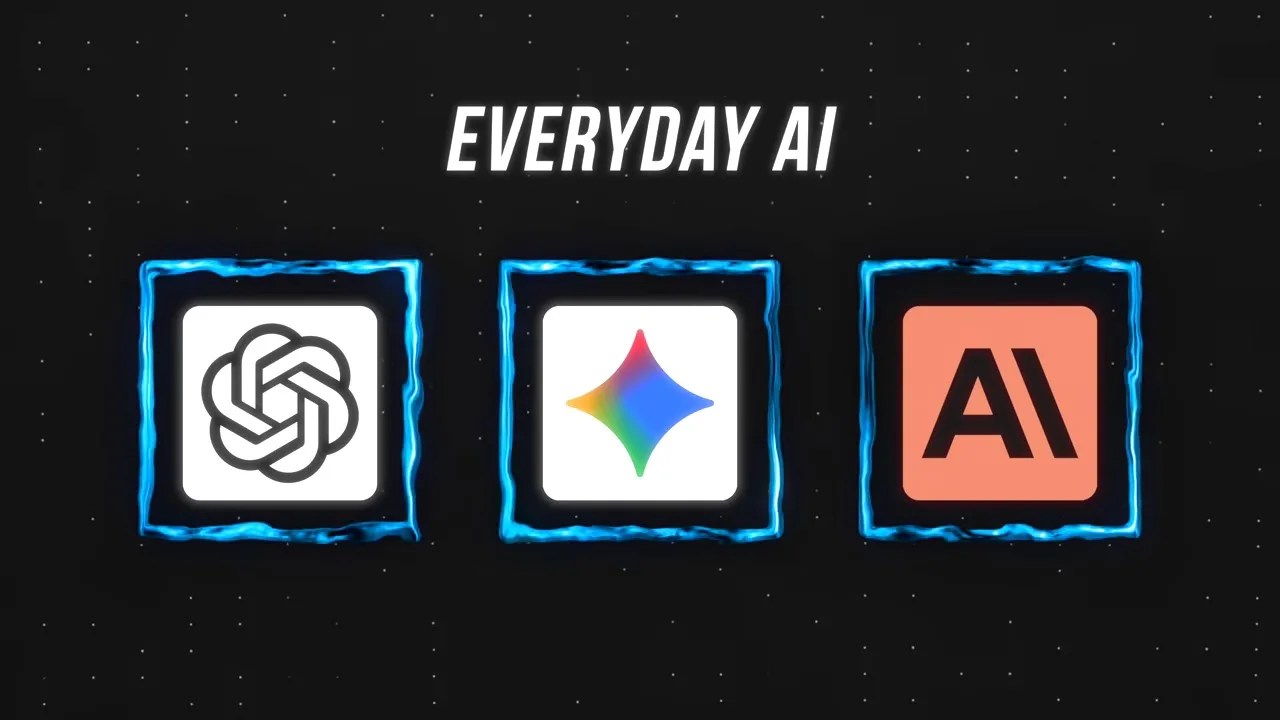
The Big Three: They look interchangeable on the surface, but their core competencies are wildly different.
If you treat them as interchangeable, you’re leaving serious productivity on the table. Let’s look at what actually sets them apart when you put them to work.
ChatGPT: The Uncompromising, Obedient Workhorse
While Claude wins beauty pageants and Gemini boasts of scale, OpenAI’s ChatGPT remains the absolute king of one crucial attribute: obedience.
If you give an AI model a highly complex, 12-step checklist with strict formatting requirements, most models will eventually drop a ball. They get distracted, try to take shortcuts, or simply decide mid-generation that they know better than you. ChatGPT doesn’t do that. It is incredibly literal and stubbornly follows instructions to the absolute letter.
To put this to the test, I ran a direct head-to-head experiment. I fed both ChatGPT and Gemini a highly detailed, complex hiring rubric containing over a dozen specific rules, structural constraints, and grading criteria. As you can see in the comparison below, the real-world performance gap was striking.

A lesson in obedience: ChatGPT outputted every single detail of the rubric, while Gemini quietly cut corners.
Gemini’s response initially looked sleek and professional, but on closer inspection, it had silently omitted several of my core requirements. ChatGPT, by contrast, checked every single box. It paused, thought through the dependencies, and executed the prompt perfectly.
This obedience extends even to basic features like web browsing. When you explicitly tell Gemini to search the web, it occasionally refuses or hallucinates a reason why it can’t. ChatGPT searches every single time without attitude. If your task has a lot of moving parts and getting one step wrong breaks the entire output, ChatGPT is your starting point.
Gemini: The Heavy-Lifting King of Massive Multimodality
If ChatGPT is the obedient analyst, Google’s Gemini is the logistics specialist. Its superpower is native multimodality backed by a staggering 1-million-token context window (and up to 2 million for enterprise accounts).
While other models can technically accept different file types, they usually convert them into text behind the scenes before analyzing them. Gemini is fundamentally different; it processes video, audio, code, and text simultaneously and natively.
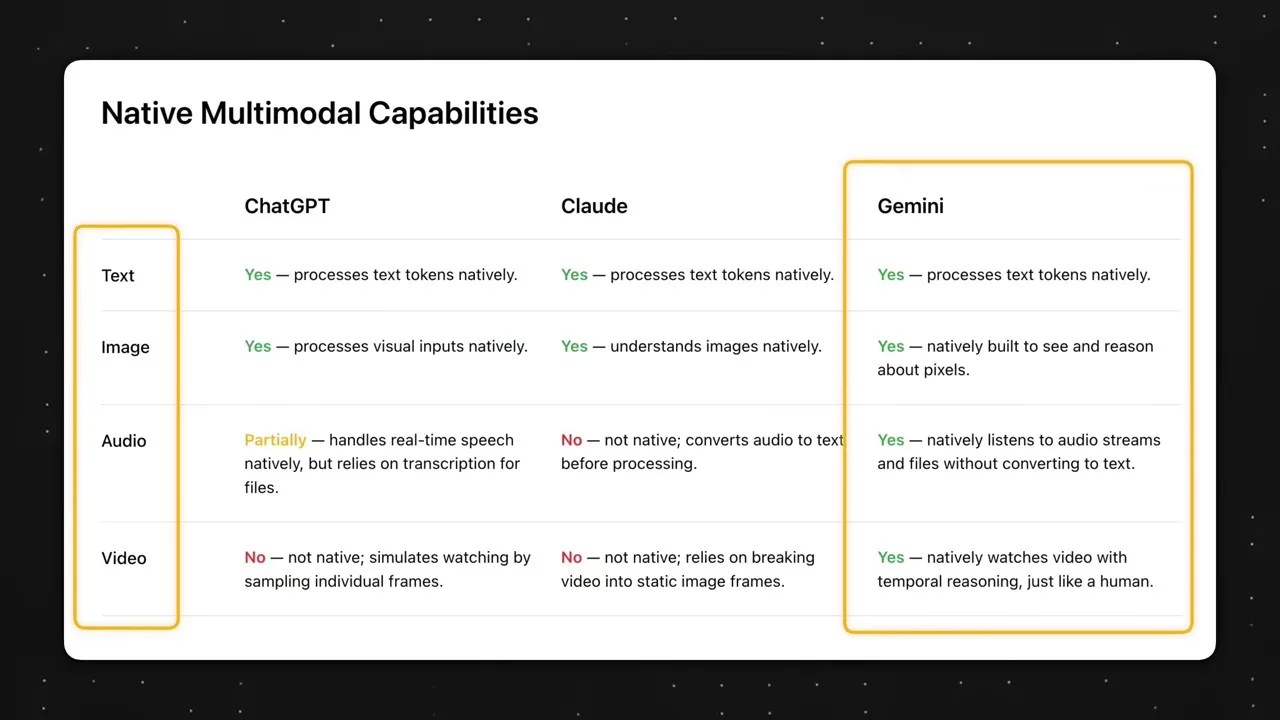
Gemini’s true edge: Native handling of all media types without messy, text-based workarounds.
This structural difference opens up workflows that would literally break ChatGPT or Claude. Imagine you’ve just wrapped up an intensive, messy planning meeting. You have an hour-long raw video recording of the call, a massive 50-slide deck used during the presentation, and a chaotic smartphone photo of the dry-erase whiteboard where you brainstormed next steps.
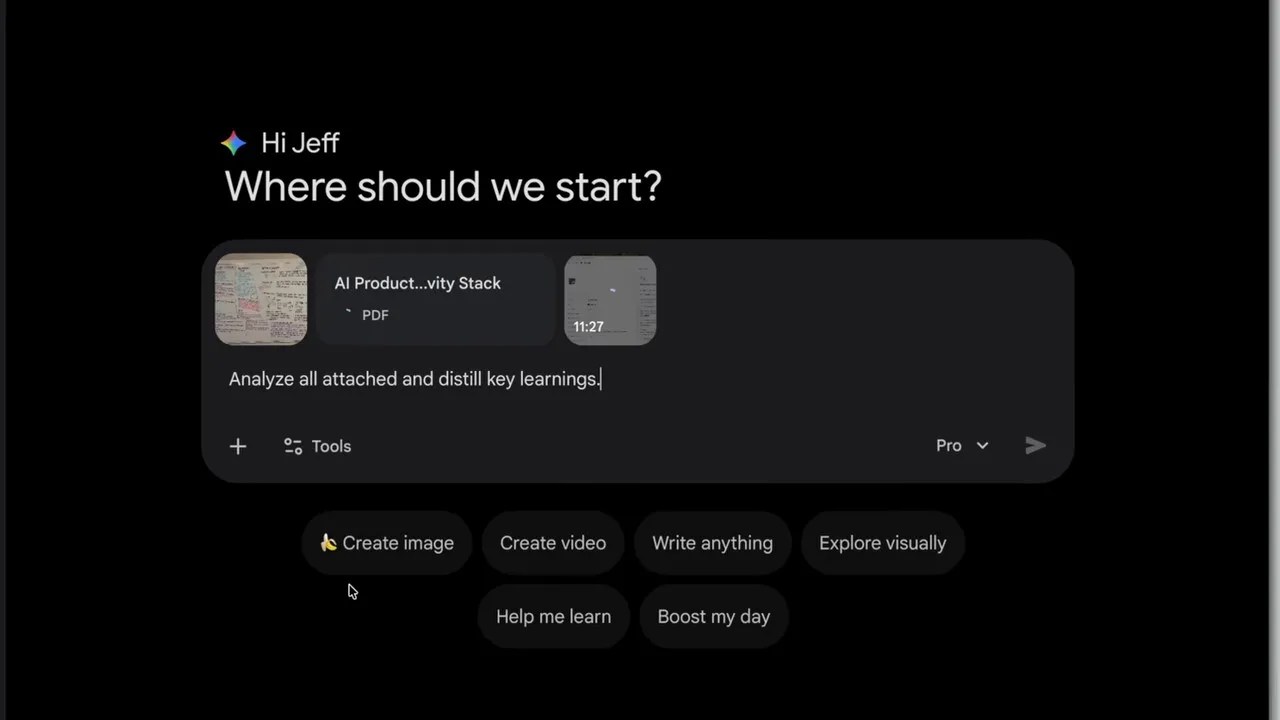
The ultimate synthesis engine: Dragging and dropping multi-format assets to build complex documents in seconds.
You can drag and drop all three file formats straight into Gemini in one single go. Within seconds, it will cross-reference the spoken dialogue in the video with the bullet points on the slide deck, reconcile both with the handwritten diagrams on the whiteboard photo, and output a polished, comprehensive meeting summary or a clean SOP. No other tool on the planet can do this without choking on the file sizes or losing context.
Claude: The Master of the Uncanny Human First Draft
Anthropic’s Claude is the creative writer and senior developer of the trio. Its undeniable superpower is generating exceptionally high-quality first drafts that sound remarkably human and require minimal polish.
This edge is obvious in two primary domains: coding and copywriting.

Coding benchmarks don’t lie: Claude consistently sits at the top of code generation and execution tests.
Ask developers which model they use when they want functional code on the very first try, and the overwhelming majority will tell you it’s Claude. It doesn’t just write syntactically correct code; it structures it logically and anticipates edge cases.
For example, when I needed to bulk-export customer service conversations from a complex API—a task their support team insisted only a veteran developer could pull off—Claude wrote a custom script in Go (a language I don’t even know how to read) and walked me through how to run it. It worked perfectly on the very first try.
Beyond code, Claude excels at matching style. ChatGPT often outputs text that feels robotic, cold, and riddled with dead giveaways of AI generation (words like “delve,” “testament,” or “moreover”). Claude, however, is a chameleon. Once you feed it a couple of examples of your writing style, it mirrors your tone, cadence, and vocabulary almost flawlessly. It’s the ultimate tool for polishing newsletters, drafting emails, or scriptwriting.
Your Everyday AI cheat sheet: Match the specific task to the model’s dominant gene.
The Specialists: Essential AI Tools for Precision Tasks
Now, let’s step outside the general-purpose chatbots and look at the specialist category. These tools don’t try to be everything to everyone. Instead, they focus on solving a singular, painful bottleneck with absolute precision. When building a lean list of essential AI tools, these are the heavy-duty utility blades you want in your back pocket.
Perplexity: The Ultimate Fact-Fetching Scalpel
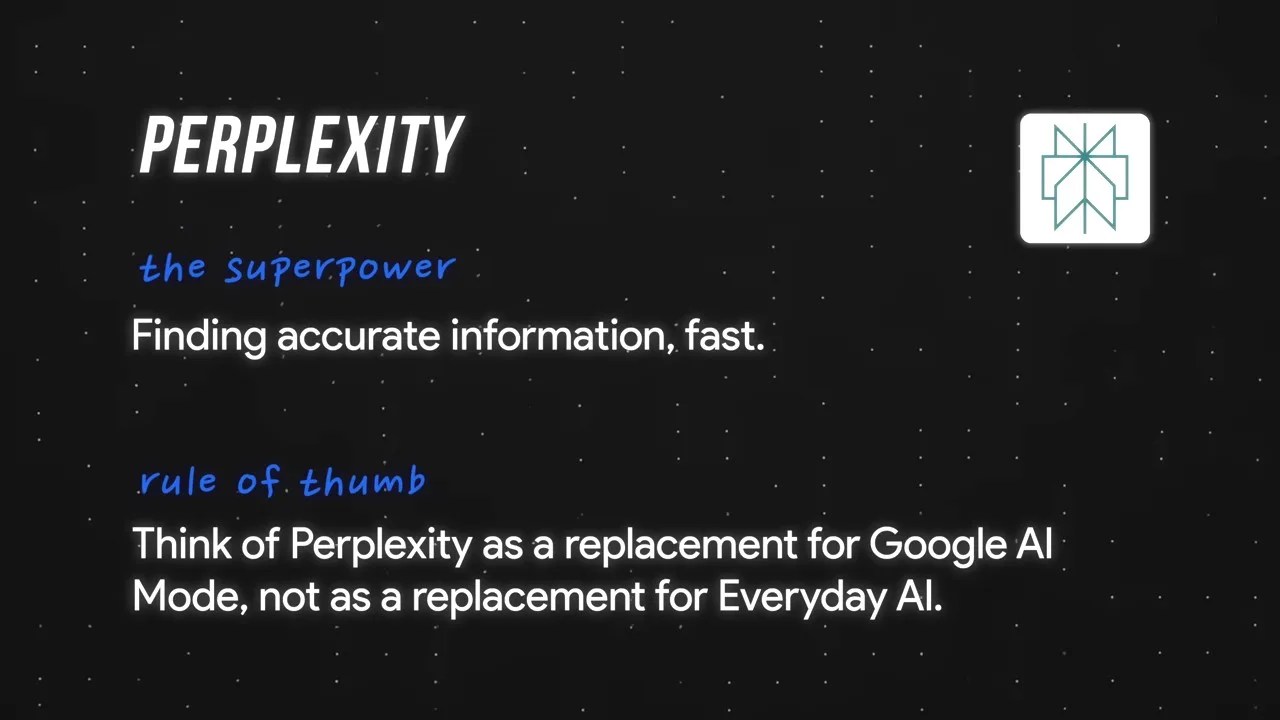
Before we look at how Perplexity works, we have to clear up a massive industry misconception: Perplexity is not a foundational model.
Understanding the engine: OpenAI builds the models, whereas Perplexity wraps and optimizes them specifically for search.
While OpenAI spends hundreds of millions of dollars training base models from scratch, Perplexity fine-tunes existing models (like Meta’s open-source Llama or Claude) and layers them over a state-of-the-art web search index.
This architectural choice dictates how you should use it. General-purpose chatbots are built for reasoning—you use them to think, brainstorm, and iterate. Perplexity is built for fetching—you use it when you need a highly specific, verified fact, and you need it right now.
If I am planning a massive personal trip and weighing complex travel itineraries, I’ll use ChatGPT to bounce ideas back and forth. But if I need to know whether a tiny restaurant in Tokyo requires reservations for English speakers, I don’t want a model to “think”—I want it to fetch. Perplexity handles this beautifully, scanning live local listings, translated forums, and blogs to give me a definitive answer in seconds, complete with inline citations.
NotebookLM: Your Zero-Hallucination Walled Garden
Google’s NotebookLM is arguably one of the most underrated tools in the entire productivity space. Its superpower is simple: it will only talk about the documents you give it.
The Walled Garden: NotebookLM locks the model inside your uploaded documents, eliminating external hallucinations.
When you use a normal chatbot to analyze a document, it still has access to its massive pre-training dataset. Sometimes, it gets lazy, mixes up external facts with the ones in your file, and spits out a hallucination.
NotebookLM acts as a secure “walled garden.” When you upload PDFs, video scripts, meeting transcripts, or research papers, the underlying Gemini model is forced to restrict its knowledge pool to those exact files. If an answer isn’t explicitly supported by your source material, it will tell you so.
I use this constantly to fact-check my own creative work. Before recording a video or publishing an analytical article, I’ll upload my final script draft alongside all the source research files. I ask NotebookLM: “Does this script make any claims that are not directly supported by the research files?” It catches tiny, subtle discrepancies and exaggerations that every other AI model slips right past.
The Minor League: Quick-Fire Utilities
While the five tools discussed above handle the bulk of my daily responsibilities, there are a few other highly specialized utilities that earned a spot in my workflow. They don’t require daily use, but when you need them, they are absolute lifesavers.
The supporting cast: Niche tools that do one specific job exceptionally well when called upon.
- Gamma: For when you need to turn a rough outline into a stunning, client-ready presentation deck in under five minutes.
- ElevenLabs: The undisputed gold standard for hyper-realistic voice cloning and synthetic narration.
- Zapier: The invisible glue that automates data passing between all your different productivity applications.
- Napkin AI: A clever tool that instantly analyzes raw paragraphs of text and auto-generates clean, contextual vector visuals to illustrate your ideas.
The Anti-Hoarding Manifesto: Why Less Is Always More
Here is my parting piece of advice, and I want you to take it seriously: Do not go out and buy subscriptions to all of these tools today.
Adding more software to your life rarely makes you more productive. It usually just makes you more distracted. The goal of building a great toolkit isn’t to use AI for everything; it is to use AI to systematically destroy specific bottlenecks in your existing workflow.
If you are just starting out, keep it incredibly simple. Pick one great general-purpose chatbot—preferably the paid tier of ChatGPT or Claude—and push it to its absolute limits. Learn its quirks, master your prompting style, and build a relationship with it. Only when you run into a hard, recurring barrier—like needing to search the live web instantly or needing to analyze massive video files—should you reach into this list and pull out a specialist tool to solve it.
Keep your tech stack lean, your focus sharp, and let the tools do the heavy lifting so you can focus on what actually matters: doing great work.